
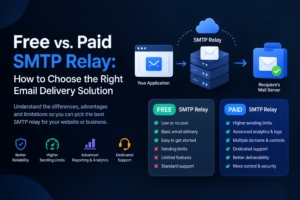
When a website sends a password reset link, an online store confirms an order, or a business delivers a customer invoice, email must travel from the application to the recipient’s mail server. An SMTP relay helps make that process reliable by accepting outgoing messages and forwarding them toward their destinations.
For small websites and growing businesses, the main question is whether a free SMTP relay is sufficient or whether paying for a dedicated Learn more at unione.io email delivery service makes more sense. The answer depends on sending volume, reliability requirements, technical resources, and the consequences of a message failing to arrive.
SMTP relay services can simplify email delivery without requiring a business to operate its own complete mail infrastructure. However, free and paid plans often differ in sending limits, reporting, support, and available controls.
What Is an SMTP Relay and How Does It Work?
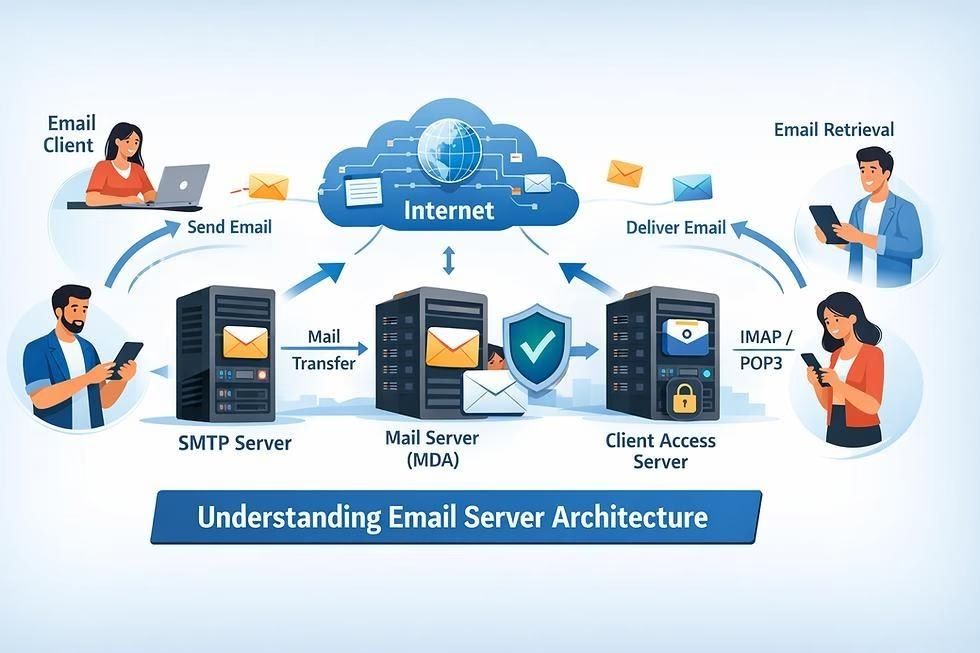
SMTP stands for Simple Mail Transfer Protocol, the standard protocol used to transmit email. An SMTP relay acts as an intermediary between the system sending a message and the recipient’s email server.
For example, imagine a customer purchases a product from an online store. The website generates an order confirmation containing the order number, payment status, and delivery details. Rather than attempting to deliver the email directly, the website passes it to an SMTP relay using an authenticated connection.
The relay processes the outgoing message and forwards it to the recipient’s mail server. The receiving system then decides whether to accept the message and where it should be placed.
A typical workflow includes these steps:
- An application generates an email after a user action.
- The application connects to the SMTP relay using the provider’s server details and credentials.
- The relay accepts the message and processes the delivery request.
- The recipient’s mail server evaluates the message and its authentication.
- The email is delivered, delayed, or rejected, depending on the outcome.
An important distinction is that successful submission to an SMTP relay does not guarantee inbox delivery. The recipient’s provider may still reject the message or classify it as spam. Domain authentication, sender reputation, message quality, and recipient engagement all influence the result.
SMTP relay is especially useful for automated emails, including account verification, shipping notifications, appointment reminders, and website contact forms.
Free SMTP Relay: What Do You Get Without Paying?
A free SMTP relay can be a sensible starting point for businesses that send a relatively small number of emails. Many providers offer free plans or trial allowances that let developers test integrations and deliver routine messages before committing to a paid subscription.
The most significant advantage is cost control. A startup can configure email verification, contact forms, or basic order notifications without immediately adding another monthly expense. Free plans can also provide access to the same basic SMTP protocol used by paid customers.
However, the word free does not mean unlimited or unrestricted.
Common limitations of free plans
Sending quotas: Providers may impose daily or monthly limits. A website sending 50 emails daily has different requirements from a store processing 2,000 orders during a major sale.
- Restricted features: Advanced analytics, detailed event logs, multiple sending domains, and sophisticated automation may require a paid plan.
- Limited support: Free users may have to rely on documentation, community forums, or standard support queues instead of receiving priority assistance.
- Shared infrastructure: Messages may travel through shared sending IP addresses. The reputation of that infrastructure can affect delivery, although providers generally apply controls to manage abuse.
- Scaling difficulties: A free plan that works during early development might become inadequate when traffic increases or the business starts sending more customer notifications.
For example, a portfolio website receiving 15 contact form submissions each day may have little reason to pay for a large email allowance. A growing subscription platform, on the other hand, might need reliable delivery of account verification links and security alerts throughout the day.
The practical approach is to evaluate the actual restrictions of each plan rather than assuming that all free SMTP services offer the same features.
Paid SMTP Relay: When Is the Extra Cost Worth It?
A paid SMTP relay becomes attractive when email is an important part of daily business operations. Its value is not simply the ability to send more messages. Depending on the provider and subscription, payment may unlock better monitoring, higher quotas, additional authentication options, dedicated support, and more control over delivery infrastructure.
Consider an online retailer sending order confirmations, shipping updates, refund notifications, and account security messages. If these emails fail to arrive, customers may contact support repeatedly or assume that their orders have not been processed. In this situation, the cost of email delivery should be compared with the potential cost of missed messages, extra support requests, and customer frustration.
Paid services can also make troubleshooting easier. Delivery logs may reveal whether a message was accepted, bounced, or rejected. Bounce processing and suppression lists can help businesses stop repeatedly sending messages to invalid addresses. Nevertheless, a paid plan does not automatically guarantee better inbox placement. Incorrect DNS records, poor list quality, spam complaints, and suspicious sending patterns can undermine delivery regardless of the subscription price.
A practical free-versus-paid comparison
| Factor | Free SMTP relay | Paid SMTP relay |
| Cost | No charge within plan limits | Recurring or usage-based fee |
| Email volume | Usually capped | Generally higher allowances |
| Reporting | Basic or limited, depending on provider | Often more detailed |
| Technical support | May be limited | May include priority support |
| Scalability | Suitable for smaller workloads | Better suited to growing workloads |
| Deliverability | Depends on setup and provider reputation | Also depends on setup and provider reputation |
These are general patterns, not universal rules. Some free plans include useful analytics, while some entry-level paid plans have restrictions. Check the provider’s current terms before choosing.
How to Choose the Right SMTP Relay for Your Business
The best option is the one that meets your requirements without introducing unnecessary cost or complexity. Before comparing providers, estimate how many emails your system sends and identify which messages are most important.
- Calculate your real email volume
Start by separating transactional emails from marketing messages.
Transactional emails include password resets, account verification, receipts, and shipping updates. Marketing emails include newsletters and promotional campaigns.
Estimate average daily volume, peak-day volume, and expected growth over the next six to twelve months. A business sending 1,000 messages monthly may fit comfortably within a free plan, but a service sending 1,000 messages during a single busy day needs to examine daily quotas carefully.
- Check domain authentication.
Email authentication is essential for protecting sender identity and supporting deliverability.
- SPF (Sender Policy Framework): Identifies servers authorized to send email for a domain.
- DKIM (DomainKeys Identified Mail): Adds a cryptographic signature that receiving systems can verify.
- DMARC (Domain-based Message Authentication, Reporting, and Conformance): Defines how receivers should handle messages that fail authentication checks and provides reporting options.
Configure the records recommended by your provider, and make sure they align with your sending domain and email practices. If multiple services send email for the same domain, review the existing DNS records before making changes.
- Evaluate security and monitoring
An SMTP relay should support encrypted connections and authentication. Keep credentials in a secure server-side configuration or secret manager rather than exposing them in public repositories or browser code. Check whether the provider offers message logs, bounce reports, complaint monitoring, and alerts. These features are particularly valuable when email is connected to payments, customer accounts, or business-critical workflows.
- Review the upgrade path
A free plan can be an excellent starting point if moving to a paid plan is straightforward. Before signing up, check how pricing changes with volume and whether important features are included or charged separately.
Also examine the provider’s acceptable-use policy. Marketing email must comply with applicable consent and unsubscribe requirements, while transactional email should be triggered by legitimate user or service activity.
Practical Example: Choosing SMTP for a Growing Online Store
Imagine an online store that sends approximately 100 emails each day. These include order confirmations, account verification links, shipping updates, and customer inquiries.
At this stage, a free relay may be sufficient if its daily quota covers normal activity and seasonal peaks. The owner should first verify the sending domain, test message delivery, and establish a process for reviewing failed emails.
Six months later, the store expands its product range and launches a promotional campaign. Daily email volume rises to 800 messages, and customer notifications become more important to business operations.
The owner now needs to assess whether the free allowance can support the increased workload. A paid plan might offer a suitable volume allowance, clearer delivery reports, and more responsive technical support.
The decision should be based on measured requirements rather than the assumption that paid services are always better. If the existing plan continues to meet demand reliably, upgrading may not be necessary. If quotas repeatedly interrupt delivery or the business needs better monitoring, the additional cost may be justified. This approach helps businesses avoid two common mistakes: paying for features they never use and waiting until email failures begin affecting customers before upgrading.
Read: Email Warmup: Tools & Strategies to Double Your Open Rates
How to Set Up an SMTP Relay Correctly
Whether you choose a free or paid service, the initial configuration deserves careful attention. A basic setup typically follows these steps.
Step 1: Create an account and verify your domain. Choose a provider and follow its instructions to establish ownership of your sending domain. Domain verification helps prevent unauthorized use of your identity.
Step 2: Configure authentication records. Add the required SPF and DKIM records to your DNS settings. Configure DMARC according to your domain’s existing setup and security requirements. Avoid creating conflicting SPF records.
Step 3: Obtain your SMTP credentials. Record the server hostname, port, username, and password or API key. Use the provider’s documented settings rather than copying configuration values from an unrelated tutorial.
Step 4: Enable encrypted communication. Use the recommended TLS configuration, commonly authenticated submission through port 587 with STARTTLS or port 465 with implicit TLS. Your application and provider must support the selected method.
Step 5: Send test messages. Test account verification, password resets, contact forms, and other important workflows. Use more than one recipient provider where possible, and inspect message headers to confirm authentication results.
Step 6: Monitor delivery. Review bounces, rejected messages, and complaints. A relay accepting a message is only one stage of the delivery process, so test the complete journey from application to recipient inbox.
These steps establish a stronger foundation for both free and paid email delivery.
Common SMTP Relay Mistakes to Avoid
Even a well-chosen service can produce poor results if the surrounding email setup is neglected. One frequent mistake is treating a free relay as an unlimited bulk-mail platform. Providers set quotas and acceptable-use rules for a reason, and attempting to bypass them can result in account restrictions.
Another mistake is sending from an unverified domain. Without proper authentication, receiving systems may distrust messages or reject them. Businesses should also avoid using purchased email lists, sending unwanted promotions, or continuing to contact addresses that repeatedly bounce.
Security is equally important. An exposed SMTP password can allow unauthorized sending, damage domain reputation, and create unexpected costs. Store credentials securely, restrict access, rotate compromised keys, and monitor unusual activity.
Finally, avoid relying on email alone for critical application events. For example, an e-commerce platform should record an order in its database before attempting to send a confirmation. If delivery fails, the system can retry the message without creating a duplicate order.
A reliable architecture treats email as an important delivery channel, with logging, retries, and appropriate error handling built into the application.
Conclusion: Free or Paid SMTP Relay?
A free SMTP relay is often the right starting point for personal websites, small applications, development environments, and businesses with modest email requirements. It provides a practical way to introduce automated communication without immediately increasing operating expenses.
A paid service becomes more appealing when message volume grows, delivery failures become costly, or the business needs stronger monitoring, greater capacity, and more comprehensive support. The decision should reflect actual usage and business risk rather than price alone. Before committing to either option, calculate your sending volume, review plan limits, authenticate your domain, and test important email workflows. Reassess these factors as your business develops.