
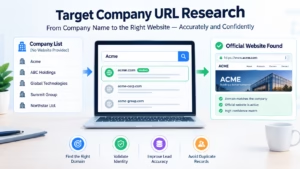
Finding a company’s official website sounds simple until you have hundreds or thousands of company names sitting in a spreadsheet or CRM.
A prospect list might contain names such as “Acme,” “ABC Holdings,” or “Global Technologies” without a website address. Searching each company manually takes significant time, and choosing the wrong domain creates bigger problems later: inaccurate lead enrichment, incorrect account matching, duplicate records, and unreliable sales research.
Target Company URL Research is the process of turning company identity information—usually a company name—into the most likely official website or domain and validating that match before using it. For B2B teams, the critical distinction lies between finding a candidate domain and confirming that it actually belongs to the target company.
What Is Target Company URL Research?
Target Company URL Research is fundamentally a company-domain matching workflow. You begin with basic unstructured inputs:
Company name (legal or trade name)
Geographic location (city, state, country)
Existing CRM information
Industry or sector classification
Associated contact details or social profile links
The objective is to determine the company’s official primary web domain with measurable confidence.
| Input Company Record | Candidate Domain | Match Confidence | Recommended Operational Action |
| Example Manufacturing LLC | examplemanufacturing.com | High | Auto-accept into CRM pipeline |
| Northstar Holdings | northstar.com | Medium | Route to SDR/Data team for validation |
| ABC Solutions | abcsolutions.com | Low | Flag for manual investigation |
A domain that looks similar to a company name is not automatically the correct website. Target company URL research becomes actionable when it combines initial discovery with identity signal validation.
Modern API implementations streamline this exact workflow by converting raw company names into verified domain structures, allowing technical teams to deploy automated endpoints across JavaScript, Python, or Google Sheets environments.
Why Finding the Correct Domain Is Harder Than It Looks
                           +-----------------------------------+
                           | Real-World Domain Matching Hurdles|
                           +-----------------------------------+
                                             |
         +-------------------+---------------+---------------+-------------------+
         |                   |                               |                   |
+-----------------+ +-----------------+             +-----------------+ +-----------------+
| Common Names    | | Corporate Structure|           | M&A / Rebrands  | | Regional TLDs   |
| Multi-entity    | | Parent vs.      |             | Domain redirects| | .com vs .de     |
| overlap         | | Subsidiary      |             | & legacy sites  | | vs subdomains   |
+-----------------+ +-----------------+             +-----------------+ +-----------------+
1. Common Company Names
A company named “Summit Group” or “Vanguard Systems” could correspond to dozens of unrelated businesses globally. A simple string-based search returns false positives, especially when multiple organizations operate in distinct industries or regions.
2. Subsidiaries and Parent Companies
A prospect may be listed under a local subsidiary while the public web presence belongs to a larger parent organization. For instance, your CRM might contain Example Medical Devices LLC, while the public-facing site uses the parent corporation’s primary brand. Automatically overwriting a record with the parent domain depends entirely on how your sales operations team defines an account structure.
3. Rebrands and Acquisitions
Corporate identities evolve continuously. A business may:
Complete a complete brand refresh
Acquire another company or undergo acquisition
Migrate to a modern top-level domain (TLD)
Consolidate multiple regional sites into a unified web presence
Maintain legacy domains that issue HTTP
301or302redirects to a new destination
An effective target company domain search protocol must account for canonical redirect behavior and corporate restructuring history.
4. International Domains
Global enterprises frequently manage localized domain hierarchies. You will regularly encounter .com, .co.uk, .de, .ca, or localized subdomains (fr.example.com). The first domain returned by a search engine is not necessarily the exact web address your sales team requires for regional account allocation.
A Practical Workflow for Finding Official Company Websites
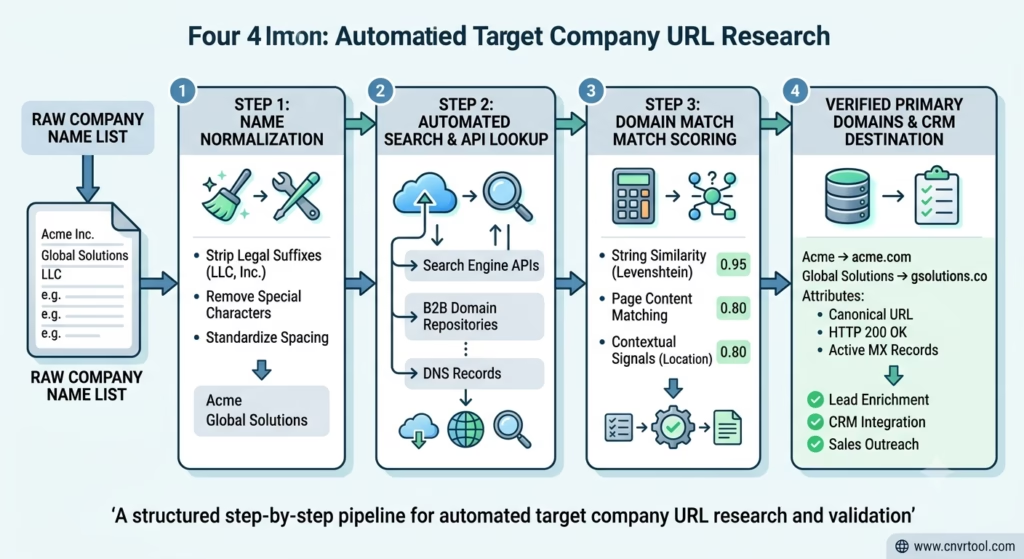
A reliable company domain search breaks down into six systematic steps.
+------------------+     +-------------------+     +--------------------+
| 1. Normalize     | --> | 2. Discover       | --> | 3. Compare Identity|
|    Company Name  |     |    Candidates     |     |    Signals         |
+------------------+     +-------------------+     +--------------------+
                                                            |
+------------------+     +-------------------+              v
| 6. Store & Audit | <-- | 5. Review         | <-- +--------------------+
|    Verified Data |     |    Exceptions     |     | 4. Assign Match    |
+------------------+     +-------------------+     |    Confidence Score|
                                                   +--------------------+
Step 1: Normalize the Company Name
Start by cleaning your source data to eliminate noise. Strip out formatting inconsistencies without permanently altering the original record:
Remove trailing spaces and duplicate punctuation
Standardize character casing
Strip common legal suffixes (e.g., “Inc.”, “LLC”, “GmbH”, “Ltd.”) where appropriate for matching engines
Example: Acme Technologies, Inc. normalizes to Acme Technologies for string-matching algorithms, while the legal name remains safely stored in a separate database field.
Step 2: Find Candidate Domains
For a tiny list, manual web searches suffice. For hundreds or thousands of records, an automated domain search engine or bulk company URL lookup system scans public indexes and corporate databases to surface probable URLs.
Step 3: Compare Company Identity Signals
Never validate a domain using string similarity alone. Cross-reference independent entity markers:
Geographic location (headquarters city, state, country)
Industry and sector classification
Contact phone numbers and corporate addresses listed on “About Us” pages
Active MX records (confirming email server infrastructure)
SSL certificates and registered WHOIS organization names
Step 4: Assign a Match or Confidence Score
A calculated company domain match score separates high-probability automated matches from edge cases requiring human inspection.
+--------------------------------------------------------------------------+
|                       Match Score Routing Protocol                       |
+-------------------+------------------------------------------------------+
| Score Category    | Action Required                                      |
+-------------------+------------------------------------------------------+
| High Confidence   | Automatically update CRM records.                    |
| Medium Confidence | Flag for rapid SDR or Data Specialist review.        |
| Low Confidence    | Route to manual research queue.                      |
| No Match Found    | Leave field unresolved; log for further checking.    |
+-------------------+------------------------------------------------------+
Step 5: Manually Review Uncertain Records
Automation should resolve routine records while isolating ambiguous entities for human review. Concentrate human attention on generic names, parent/subsidiary overlaps, active rebrands, and non-standard TLDs.
Step 6: Store the Verified Domain
Save verified domains into dedicated CRM fields (Primary_Website__c). To preserve complete auditability, retain surrounding metadata:
Original_Company_NameNormalized_Company_NameVerified_DomainDomain_Match_ScoreVerification_StatusLast_Checked_Date
Bulk Company URL Lookup and API Integration
Manual verification fails when sales operations teams must process high-volume lists.
Structuring a Bulk Lookup Pipeline
A bulk domain lookup workflow processes datasets systematically:
[CSV / CRM Export] ➔ [Name Normalization Engine] ➔ [Domain Matching API]
                                                              |
                                                              v
[CRM Database Update] ⇦ [High Confidence Matches] ⇦ [Match Score Gatekeeper]
                                                              |
                                                              v
                                                   [Manual Review Queue]
Programmatic API Execution
Integrating a specialized domain search API embeds automated verification directly into your data pipelines. When a new account is created inside a CRM or lead capture form, the backend transmits the raw business details to the API endpoint and receives structured JSON responses containing candidate domains and match scores.
According to the official Target Company URL Research API documentation (updated in August 2026), developers can deploy free lookup endpoints across JavaScript, Python, and Google Sheets environments to perform programmatic domain verification.
Python Implementation Example
import requests

def lookup_company_domain(company_name, country="US"):
    endpoint = "https://targetcompanyurlresearch.com/api/lookup"
    payload = {
        "company_name": company_name,
        "country": country
    }
    headers = {"Content-Type": "application/json"}

    response = requests.post(endpoint, json=payload, headers=headers)
    if response.status_code == 200:
        data = response.json()
        return data.get("domain"), data.get("confidence_score")
    return None, 0.0

# Example usage
domain, score = lookup_company_domain("Example Manufacturing")
print(f"Discovered Domain: {domain} (Score: {score})")
How to Handle Difficult Domain Matches
Subsidiaries and Divisions
Establish explicit operational definitions for your CRM account hierarchy. If a subsidiary maintains distinct brand messaging, product suites, and sales teams, store its specific web domain. If it operates purely as an administrative shell under a parent umbrella, mapping to the primary corporate domain is usually preferred. Document these rules in your data governance handbook.
Rebrands and M&A Activity
When a target undergoes a name change or acquisition, test whether the historical domain executes a canonical 301 redirect to the new destination. Retain historical domains in legacy database fields—they are crucial for deduplicating old contact records, mapping historical email addresses, and tracing past sales activity.
Generic Corporate Names
Differentiating between entities named “United Systems” requires geographic bounding and sector filtering. Always append state, city, or primary product categories to your matching query when dealing with non-distinctive business names.
Read More: 10 Ways to Ensure Your CRM Software Adapts to Evolving Business Demands
Common Mistakes in Company Domain Research
Matching Solely on Name Similarity: Relying exclusively on text string matching leads to significant false-positive rates for common corporate names.
Trusting the First Search Result Unchecked: Search engine queries often surface review sites, directories, social profiles (LinkedIn, Glassdoor), or news articles above the company’s official web domain.
Ignoring Canonical Redirects: Failing to resolve HTTP
301/302redirects results in storing legacy web addresses that can break downstream email validation routines.Treating API Output as Unconditional Truth: Over-relying on automated API lookups without setting confidence score thresholds introduces bad data into your CRM.
Destructive Data Overwriting: Replacing existing web domain values across an entire database without maintaining historical audit logs or backup fields creates data recovery risks.
Best Practices for Lead Enrichment and Data Hygiene
Maintain Source Integrity: Never overwrite raw input names. Preserve original names alongside normalized matching strings.
Log Verification Timestamps: Web domain ownership shifts over time. Record exact verification dates (
Domain_Last_Verified__c) to trigger periodic re-verification cycles.Validate Infrastructure Technicals: Ensure candidate domains possess active MX records and valid SSL certificates before marking them as operational B2B web properties.
Define Clear Parent/Subsidiary Rules: Prevent SDR confusion by establishing clear rules regarding when to use parent domains versus localized subsidiary pages.
Implement Soft Database Updates: When performing bulk enrichments, write new domain results to staging fields (
Suggested_Domain__c) prior to final database commits.
Read More: How AI Is Transforming B2B Lead Generation and Conversion Strategies
Manual Tools vs. Automated Workflows
| Evaluation Metric | Free Company Website Finder (Manual) | Automated Bulk API / Script Workflow |
| Optimal List Size | 1 – 50 records | 500 – 100,000+ records |
| Processing Speed | ~2–3 minutes per record | Hundreds of records per minute |
| Best Use Case | One-off SDR checks, enterprise ABM research | CRM data cleaning, lead enrichment, bulk list processing |
| Technical Requirement | None (Web browser interface) | Developer integration (Python, JS, Google Sheets API) |
| Error Rate Risk | Human fatigue on large lists | False positives on low-confidence matches |
Frequently Asked Questions
What is Target Company URL Research?
Target Company URL Research is the systematic process of identifying, matching, and validating the official primary web domain associated with a specific business entity using company name inputs and supporting identity signals.
How do I find an official company website accurately?
Start by normalizing the company name, then use discovery tools or search APIs to identify candidate URLs. Compare additional identity signals such as headquarters location, industry type, and canonical redirect behavior to confirm ownership.
Can I perform company URL lookup in bulk?
Yes. Bulk company URL lookups process spreadsheet exports (CSV) or CRM lists through automated domain matching algorithms or dedicated APIs, separating clean matches from edge cases requiring human inspection.
Is an API domain match automatically correct?
No. API results reflect probabilistic matching based on available public data. Always filter API outputs using confidence scores and route ambiguous records to a manual review queue.
What is a company domain match score?
A company domain match score is a numeric confidence value (e.g., 0% to 100% or High/Medium/Low) generated by matching engines to indicate the likelihood that a discovered web domain belongs to the queried business entity.
How should subsidiaries be handled in domain searches?
Apply a consistent account management policy: if the subsidiary operates independently with its own sales team, store the subsidiary URL. If it functions purely as a legal entity under a main brand, use the primary parent domain.
Should old company domains be deleted during rebrands?
No. Retaining historical domains in secondary database fields is essential for auditing old CRM records, deduplicating incoming contacts, and maintaining historical email routing context.
Is a free company website finder sufficient for B2B prospecting?
Free web-based lookup tools are adequate for ad-hoc research or small prospect lists. However, scaling outbound operations requires bulk CSV processing or API integration to handle data volume efficiently.
About the Author
Steve Smith writes about SEO, software, digital tools, and practical online workflows for cnvrtool.com. His experience includes testing domain-search APIs, cleaning B2B prospect lists in bulk, and navigating complex domain matching challenges such as subsidiaries, rebrands, generic business names, and match confidence validation.