

If you are inspecting Web Application Firewall (WAF) blocks, analyzing raw Nginx error logs, or debugging routing scripts and encounter a string like 111.90.150.1888 or 1111.90.150.188, your system will reject it as an invalid IP address syntax error.
The reason is simple: IPv4 addresses cannot contain numbers greater than 255 in any section.
Strings like 111.90.150.1888 break the foundational rules of internet routing established in IETF RFC 791 (Internet Protocol Specification). Whether you are dealing with an extra digit added by a log processing glitch or a manual typing mistake, understanding why the network stack drops these packets requires looking at the 32-bit binary structure behind IPv4 addressing. For a broader overview of diagnostic workflows and layer execution, refer to our comprehensive Network Troubleshooting Guide.
The Mathematics of IPv4: Why 255 Is the Hard Ceiling
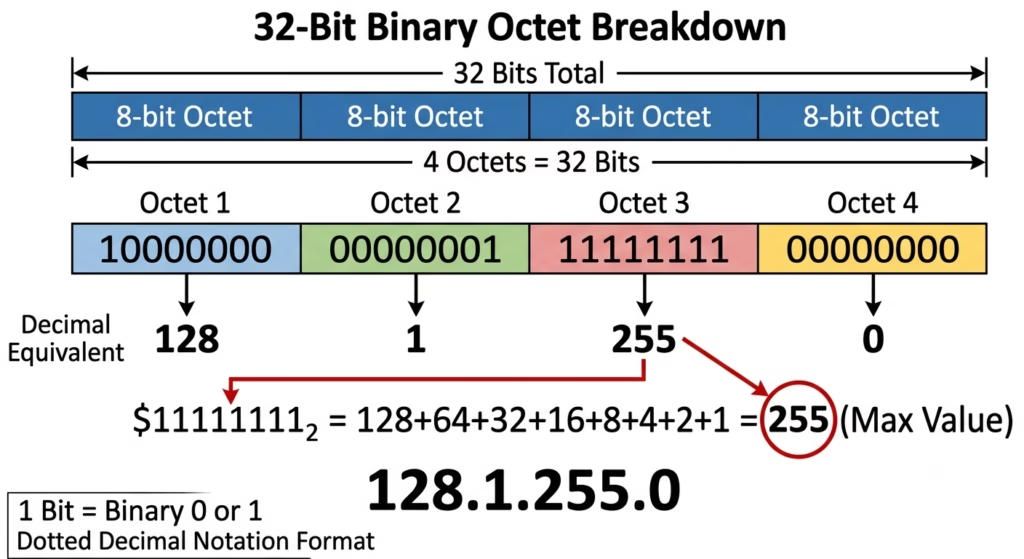
Every standard Internet Protocol version 4 (IPv4) address is a 32-bit binary number. Because raw 32-bit binary strings (such as 01101111010110100100011010111100) are difficult for humans to read, the industry uses dotted-decimal notation.
In dotted-decimal notation, the 32 bits are divided into four equal segments called octets (8 bits each), separated by periods:
The 8-Bit Binary Boundary
Each octet represents an 8-bit unsigned integer. An 8-bit binary position can store $2^8$ (256) total unique combinations of zeros and ones, ranging from 00000000 to 11111111.
| Binary Representation | Calculation (27+26+25+24+23+22+21+20) | Decimal Equivalent |
00000000 | $0+0+0+0+0+0+0+0$ | 0 (Minimum value) |
00000001 | $0+0+0+0+0+0+0+1$ | 1 |
10000000 | $128+0+0+0+0+0+0+0$ | 128 |
11111111 | $128+64+32+16+8+4+2+1$ | 255 (Maximum value) |
Because 11111111 evaluates to 255 in base-10 arithmetic, 255 is the mathematical maximum value an IPv4 octet can represent.
When a string contains 1888 or 1111, it requires more than 8 bits of memory to express ($1888_{10} = 11101100000_2$, which requires 11 bits). As a result, software network stacks fail to parse the value into a standard 32-bit memory register—a common root cause broken down in our breakdown of the Invalid IP Address 212.32.226.324.
Anatomy of the Error: Dissecting 111.90.150.1888
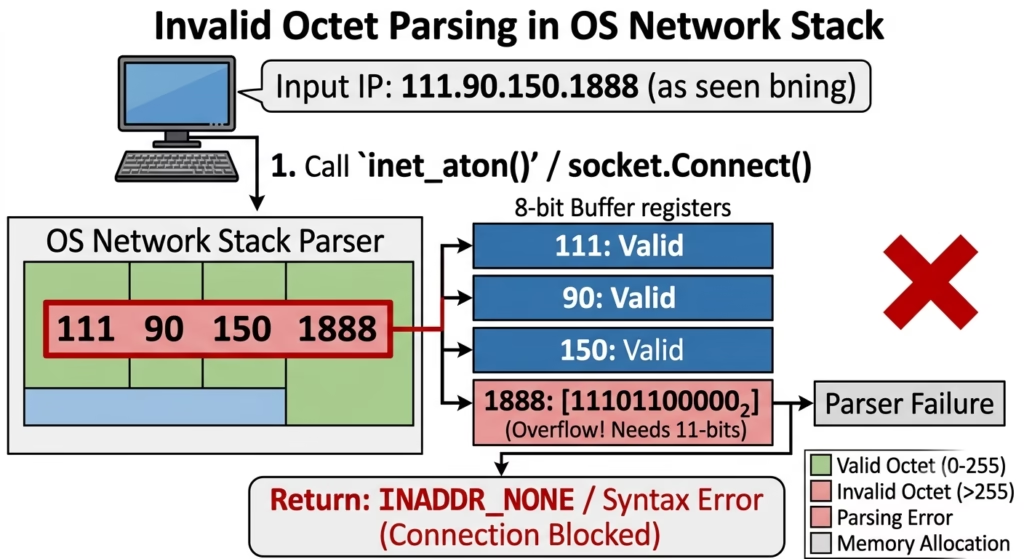
When an out-of-range value appears in security telemetry, it usually fits one of two structural anomalies:
[1111] . [90] . [150] . [188]  ---> Octet 1 exceeds 255 limit (1111 > 255)
 [111] . [90] . [150] . [1888] ---> Octet 4 exceeds 255 limit (1888 > 255)
Both examples break the syntax validation step in systems programming, similar to the log anomalies detailed in our IP Lookup Guide 164.68.1111.161. Low-level networking functions such as C’s inet_aton() or Python’s socket.inet_aton() parse string representations into binary network addresses.
When passed 111.90.150.1888, the parser evaluates each substring split by dots:
111$\rightarrow$ Valid (0–255)90$\rightarrow$ Valid (0–255)150$\rightarrow$ Valid (0–255)1888$\rightarrow$ Invalid (Exceeds maximum 8-bit integer capacity of 255)
The execution halts immediately, returning an INADDR_NONE or ValueError status code instead of passing the IP to lower network layers.
How Network Stacks and Routers Handle Invalid IPs
If an invalid IP string makes its way into a software application or packet generator, downstream network components protect themselves by failing safely.
+------------------------+      +------------------------+      +------------------------+
|   Raw Application Log  | ---> |   OS Socket Parser     | ---> |   Firewall / Router    |
| ("111.90.150.1888")    |      | (`inet_aton` fails)    |      | (Packet Drop / Error)  |
+------------------------+      +------------------------+      +------------------------+
1. Parser Level Rejection
Operating systems check IP address formatting before building a packet’s IP header. If an application attempts to bind or connect to 111.90.150.1888, the OS socket interface throws a syntax error before sending bits over the wire.
2. Firewall Rule Failures
Adding 111.90.150.1888 to security utilities like iptables, UFW, or AWS Security Groups causes the parser to fail:
Bash
# Example iptables command with invalid octet
$ iptables -A INPUT -s 111.90.150.1888 -j DROP
iptables v1.8.7 (legacy): host/network `111.90.150.1888' not found
Security tools reject the entire rule rather than risk misinterpreting the target IP address.
3. Router Packet Drop
If raw network testing tools bypass high-level string parsers and force extra bits into an IP header field, hardware routers drop the corrupted frame during hardware validation checks. The invalid length fields corrupt the fixed 20-byte IPv4 header alignment.
Common Causes of Out-of-Range IP Anomalies in System Logs
Seeing an invalid address in log files does not necessarily mean your system is under a sophisticated cyberattack. The most common causes are routine software errors and configuration oversights.
1. Port Number Concatenation
The most common cause of 111.90.150.1888 is a missing colon during string concatenation of an IP address and a port number.
Intended socket:
111.90.150.188:8(IP111.90.150.188on port 8)Concatenation Bug: Stripping the colon converts the string into
111.90.150.1888, turning a valid IP into an unparseable 4-digit octet.
2. Manual Configuration Typos
System administrators updating DNS zone files, static interfaces, or ACL rules can accidentally hit a key twice (e.g., typing 1111 instead of 111, or 1888 instead of 188).
3. Log Truncation & Field Misalignment
Log parsing scripts using fixed-width column extraction often slice fields incorrectly. If a log entry shifts by one character, part of an adjacent HTTP status code, timestamp, or port number can attach to the end of the IP string, or trigger octet syntax errors like those analyzed in our IP Analysis 081.63.253.200.
4. Malicious Input Fuzzing
Threat actors often target web applications with malformed HTTP request headers (such as X-Forwarded-For: 111.90.150.1888). This tests whether your logging pipeline or WAF crashes when processing unexpected, out-of-range string lengths.
Check Out : 111.90.1502 Not Working? Correct IP Format & Quick Access Fix
How to Diagnose and Fix Invalid IP Errors
If your network scripts or log processors fail on malformed IPs, follow this systematic remediation process. (For additional step-by-step firewall log parsing examples, consult the 111.90.150.284 IP Address Guide).
Architectural Comparison: IPv4 vs. IPv6 Boundaries
As systems shift to IPv6, string formatting rules expand from 32-bit decimal numbers to 128-bit hexadecimal blocks. The global allocation rules for both address families are governed by the IANA IPv4 Address Space Registry, which defines the strict structural limits enforced across internet routing tables.
| Feature | IPv4 | IPv6 |
| Address Length | 32 bits (4 bytes) | 128 bits (16 bytes) |
| Notation Format | Dotted Decimal (e.g., 111.90.150.188) | Colon Hexadecimal (e.g., 2001:db8::1) |
| Segment Structure | 4 octets (8 bits per octet) | 8 blocks (16 bits per block) |
| Segment Value Range | 0 to 255 (Decimal) | 0000 to ffff (Hexadecimal) |
| Handling of Extra Digits | Values $> 255$ throw syntax errors | Values $> \text{FFFF}$ throw syntax errors |
Frequently Asked Questions
What happens if I try to ping 111.90.150.1888?
Your operating system’s command-line tool will fail immediately with an error message such as ping: cannot resolve 111.90.150.1888: Unknown host or Ping request could not find host. The OS treats any string with an out-of-range octet as an invalid domain name rather than an IP address.
Can an IPv4 address ever contain a number larger than 255?
No. Under standard IPv4 specifications (RFC 791), 255 is the absolute maximum value for any of the four octets.
How do I stop malformed IPs from breaking my security scripts?
Validate all IP strings with your language’s native IP parsing library (such as ipaddress in Python or net.ParseIP in Go) before feeding them into firewall commands or database queries.
About the Author
Steve Smith is a cybersecurity researcher and technical writer specializing in network diagnostics, WHOIS intelligence, and threat telemetry. With a background in systems analysis, Steve translates complex IP routing data, server logs, and security infrastructure into actionable insights for webmasters and network administrators. When not analyzing network traffic, he focuses on making web security accessible to everyday internet users.