
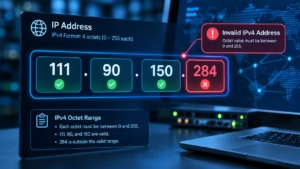
If you encountered 111.90.150.284 in a server log, security report, application, or network configuration, the first thing to check is whether it is actually a valid IP address.
It looks like a conventional IPv4 address because it contains four numbers separated by periods. However, there is a problem with the final number: 284 is outside the valid IPv4 octet range.
An IPv4 address contains four octets, and each octet must be between 0 and 255. IANA explicitly describes IPv4 addresses as four numbers separated by dots, with each number ranging from 0 to 255.
That means 111.90.150.284 is not a valid IPv4 address as written.
This distinction matters because a malformed address cannot be treated like a normal public IP when investigating its location, ISP, ownership, or security reputation.
Is 111.90.150.284 a Valid IP Address?
No.
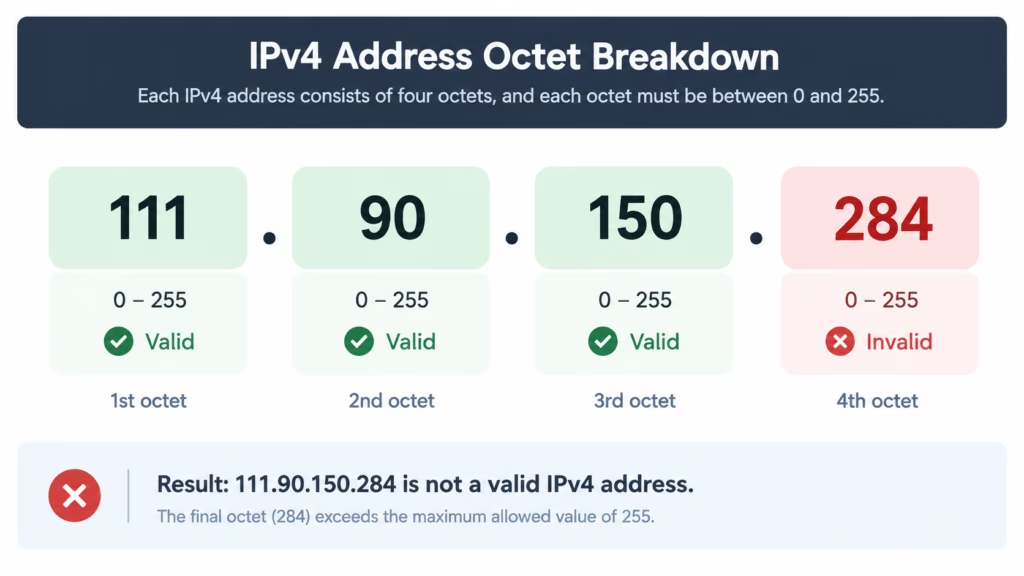
The address can be separated into four IPv4 octets:
| Octet | Value | Valid? |
|---|---|---|
| 1 | 111 | Yes |
| 2 | 90 | Yes |
| 3 | 150 | Yes |
| 4 | 284 | No |
The first three values fall within the permitted 0–255 range. The final value, 284, does not.
IPv4 uses a 32-bit address format divided into four octets. RFC 791 defines an Internet address as a four-octet, 32-bit address.
Because one octet is invalid, the complete string cannot represent a conventional IPv4 host address.
Why 284 Is the Problem
The largest possible value for a single IPv4 octet is 255.
So:
111— valid90— valid150— valid284— invalid
This is sometimes described as an IPv4 format error or malformed IP address.
It is important not to “correct” the address automatically. For example, changing 284 to 255 would create 111.90.150.255, but that would be a completely different address and there is no basis for assuming that was the intended value.
Check Out : 111.90.150.1888: Why Numbers Above 255 Break IPv4
What Does an IPv4 Address Look Like?
A standard IPv4 address contains four decimal octets separated by periods.
Examples include:
192.168.1.18.8.8.8203.0.113.25
Each octet can contain a value from 0 through 255. This follows from the 8-bit structure of each component.
For comparison:
Valid:
111.90.150.254
Invalid:
111.90.150.284
The two strings look almost identical, but the final octet changes the result completely.
For more background on IP addressing and practical network diagnosis, see the Network Troubleshooting Guide.
Can You Perform an IP Lookup on 111.90.150.284?
Not reliably as an IPv4 host lookup.
A conventional IP lookup service expects a valid IP address. Since 111.90.150.284 contains an invalid octet, a lookup service may reject it, return an error, or fail to provide meaningful host information.
This means you should be cautious if a website claims to provide a precise location, ISP, hostname, or owner for 111.90.150.284 itself.
There is an important distinction between the malformed address and nearby valid addresses.
For example, the broader 111.90.150.0/24 network contains valid addresses whose final octets range from 0 through 255. Third-party network databases currently associate that range with network infrastructure, but information about the range does not prove that 111.90.150.284 exists or belongs to the same organization.
Do not confuse a network-range result with a lookup result for the malformed address.
What Is the Location of 111.90.150.284?
There is no legitimate geographic location that can be assigned to 111.90.150.284 as an IPv4 host address because the address is invalid.
IP geolocation databases work with actual IP addresses and network allocations. If the supplied value is malformed, the location result may be:
- unavailable,
- rejected,
- incorrectly normalized,
- associated with a different address, or
- based on an assumed correction.
The safest approach is to verify the original value before drawing conclusions.
For example, a valid address such as 111.90.150.209 can have network and geolocation information in third-party databases. But that information cannot be transferred to 111.90.150.284.
Why This Matters
Suppose a security log contains:
111.90.150.284
It would be tempting to search the first three octets and conclude that the resulting ISP or city belongs to the source.
That would be a mistake.
The invalid final octet means the exact address needs to be investigated first.
Is 111.90.150.284 Safe?
The question “Is 111.90.150.284 safe?” cannot be answered in the same way as it can for a valid IP address.
The address itself is invalid, so it should not be treated as evidence that a particular server, user, or organization generated malicious traffic.
If you discovered it in a security log, investigate why the malformed value appeared rather than immediately treating the string as a malicious host.
For example, it could result from:
- A typing mistake
- A copied value containing an error
- A logging or parsing problem
- Incorrect data transformation
- An application bug
- A malformed security-report entry
- A human-entered configuration value
- An incorrectly generated IP-like string
The presence of an invalid IP does not, by itself, prove an attack.
Why Might 111.90.150.284 Appear in a Server Log?
Malformed IP addresses can appear at different stages of a technical workflow.
1. Manual Entry
Someone may have entered an IP address incorrectly.
A single digit can turn a valid address into an invalid one.
For example:
111.90.150.28
versus
111.90.150.284
The second version contains an extra digit.
2. Application or Logging Bug
A program may incorrectly process an address or combine numeric fields during data transformation.
If multiple malformed addresses appear in the same log, investigate the application or logging pipeline rather than assuming every value represents an external host.
3. Parsing Problems
An application may parse an IP-like string incorrectly after receiving information from another system.
This can happen when logs are imported, transformed, serialized, or displayed by another application.
4. Copy-and-Paste Errors
Security investigations often involve copying IP addresses between dashboards, spreadsheets, tickets, and reports. Manual transcription can introduce errors.
5. Incorrect Data Generation
If a tool generates IP addresses programmatically, a validation failure may allow an out-of-range octet to appear in output.
This is particularly worth investigating when the same pattern occurs repeatedly.
Check Out : 111.90.1502 Not Working? Correct IP Format & Quick Access Fix
How to Troubleshoot 111.90.150.284
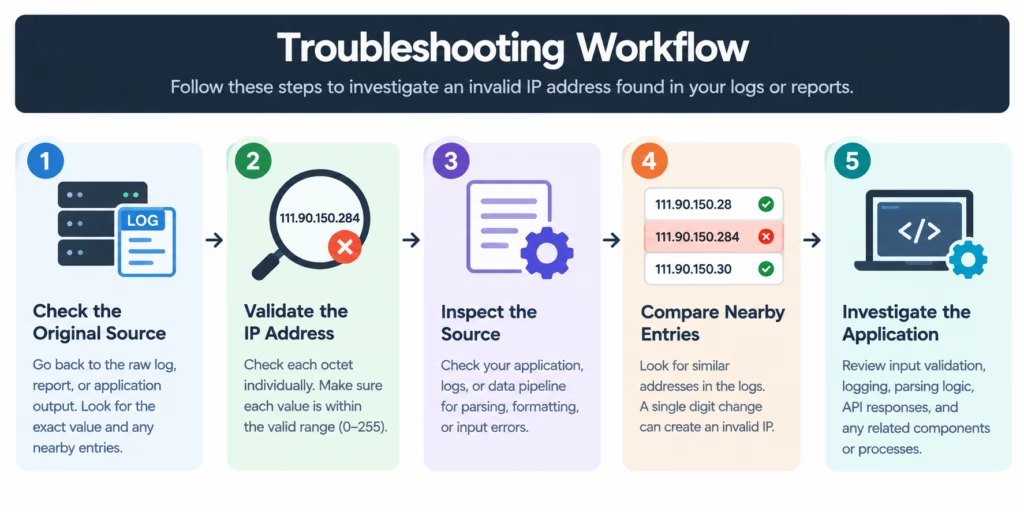
If you found this address in a real system, use the following process.
Step 1: Check the Original Source
Go back to the original log, report, or application output.
Do not rely on a screenshot or manually copied value if the raw record is available.
Look for nearby entries.
If you find:
111.90.150.28
and elsewhere:
111.90.150.284
the latter may simply be a transcription or formatting error.
Step 2: Validate the Address
Check each octet individually.
For this address:
111 | 90 | 150 | 284
The fourth octet immediately fails the standard IPv4 range check.
Step 3: Look for Similar Valid Addresses
Search the surrounding log entries for addresses sharing the same first three octets.
Do not assume that one of them is the intended address, but they can provide useful context.
Step 4: Check the Application
If the malformed value was generated by your own website, application, or monitoring system, examine the component that created the record.
Look at:
- Input validation
- Log formatting
- Parsing functions
- API responses
- Database fields
- Import/export processes
- IP extraction logic
Step 5: Use Network Tools Only After Validation
Commands such as ping and traceroute are useful for troubleshooting valid addresses.
For example:
ping 111.90.150.28
or:
traceroute 111.90.150.28
The exact command varies by operating system.
However, do not substitute a guessed correction simply to make the command run.
For broader network diagnostics, the IP addressing and network troubleshooting guide provides additional context.
Common Mistakes When Investigating Invalid IP Addresses
Mistake 1: Assuming Every Four-Part Number Is an IP
Four numbers separated by periods can look like an IPv4 address, but formatting alone does not make it valid.
Mistake 2: Automatically Replacing 284 With 255
There is no technical basis for assuming that 284 was intended to be 255.
The correct value should come from the original data source.
Mistake 3: Using the Network Range as the Exact Address
A valid range surrounding an invalid value does not make the invalid value valid.
For example, information about 111.90.150.0/24 should not be presented as information about 111.90.150.284.
Mistake 4: Treating Invalid Data as Proof of Malicious Activity
A malformed IP may be caused by an error, bug, or bad data transformation. Additional evidence is required before calling it malicious.
Mistake 5: Trusting an Unverified Geolocation Result
If a lookup tool returns a location for a malformed address, determine whether the service normalized or interpreted the input before using the result.
What If You Meant a Different IP Address?
If you encountered 111.90.150.284 in a document, log, or report, compare it against the original source.
A typo could have occurred in:
- The final octet
- One of the first three octets
- The order of the octets
- A copied or exported value
If the original source contains another address, investigate that exact valid address instead.
CNVRTool also covers other malformed IP examples, including 164.68.1111.161 and 212.32.226.324.
For another IP-analysis example, see 081.63.253.200.
Common Typographical Variations of 111.90.150.284
When checking a copied IP address, you may encounter variations that look similar to 111.90.150.284 but are malformed in different ways. For example:
| IP-like value | Issue |
|---|---|
111.90.1502 | Contains only three dot-separated components, with 1502 exceeding the valid octet range |
111.190150.204 | The second component is 190150, which exceeds the valid 0–255 range |
111.90.1502. | Contains an incomplete final component and an out-of-range 1502 component |
111.90.150.288 | The final octet 288 exceeds the maximum IPv4 value of 255 |
111.90.l50.204 | Uses the letter l instead of the numeric digit 1 in the third component |
These examples show why an IP address should be validated exactly as it appears in the original log, report, or configuration. A small typing, copying, or formatting error can turn an otherwise familiar-looking string into an invalid IPv4 address.
Do not automatically replace or “fix” any of these values. Instead, return to the original source and determine what address was actually recorded before performing a location, WHOIS, or security lookup.
Similar octet overflow errors occur when entering 2044 instead of 240. Check out our detailed walkthrough on how to resolve 111.90.150.2044 typos.
The Bottom Line
111.90.150.284 is not a valid IPv4 address.
The reason is straightforward: the fourth octet is 284, while IPv4 octets must fall between 0 and 255. IANA documents this four-number IPv4 format and its 0–255 octet range.
Because the address is malformed, you should not assign a location, ISP, owner, or security reputation to it as though it were a valid public IP.
If it appeared in a log or security report, the more useful question is where the malformed value came from. Check the original record, compare nearby entries, inspect the application’s parsing and logging process, and verify any suspected replacement address before performing a lookup.
That approach prevents a simple data-entry or processing error from turning into an incorrect network or security conclusion.
Frequently Asked Questions
Is 111.90.150.284 a valid IPv4 address?
No. The fourth octet is 284, which exceeds the maximum IPv4 octet value of 255.
What is wrong with 111.90.150.284?
The first three octets—111, 90, and 150—are valid, but 284 is outside the permitted 0–255 range.
Can I find the location of 111.90.150.284?
Not as a valid IPv4 host address. Because the address is malformed, a location result for the exact string should not be treated as reliable.
Is 111.90.150.284 dangerous?
The malformed address alone does not establish that it is malicious. If it appears in a security log, investigate the source of the malformed value and look for supporting evidence.
Why would an invalid IP address appear in a server log?
Possible causes include manual typing errors, application bugs, parsing problems, data-transformation errors, or incorrect reporting.
Can I perform a WHOIS lookup on 111.90.150.284?
A normal IP registration lookup requires a valid address. Since 111.90.150.284 is invalid, you should verify the original address before relying on WHOIS or geolocation information.
Could 111.90.150.284 be a typo?
Yes. A malformed final octet can result from manual entry, copying errors, software processing, or incorrect data generation. The original source should be checked before guessing the intended address.
What is the maximum number allowed in an IPv4 octet?
The maximum is 255. Each of the four IPv4 octets must contain a value from 0 through 255.
About the Author
Steve Smith is a cybersecurity researcher and technical writer specializing in network diagnostics, WHOIS intelligence, and threat telemetry. With a background in systems analysis, Steve translates complex IP routing data, server logs, and security infrastructure into actionable insights for webmasters and network administrators. When not analyzing network traffic, he focuses on making web security accessible to everyday internet users.